


We've all heard the rumors that we - the developers - will be replaced by genAI soon. The layoffs in recent years have been concerning to say the least.
In this blog post, I'll introduce you to cursor AI and draw my own conclusions regarding my imminent replacement by that which I help create.
The challenge I gave myself is to build a boardgame with reinforcement learning with only prompting - I'm not allowed to code. The result is on GitHub.
Note that this post isn't sponsored, it's just an interesting example of current developments with generative AI assisted workflow.
What is Cursor AI?
Cursor is a code editor, but with LLM enhancements. First, it enhances the common suggestion/autocomplete feature into multiple edits at once. When you start coding, it sees what you did and does exactly what LLMs are made for: It predicts what you'll code next.
It allows you to type carelessly; it autofixes typos, drawing from both the language constructs and your own context (e.g. variable names).
A really cool feature is that you can use CTRL+L to open a chat with the LLM. It will have the context of your current file, and you can ask it questions about the code. This can go from "Can you explain what the current module does" to "Can you spot any bugs in this file"?
In any interaction with the LLM, you can use the @ symbol to add context - other code files. So, you might be able to ask more complicated questions such as "When we take this file together with @src/logic/utilities.py, what can we do?". The chat suggests changes to your code that can be applied immediately.
Inside your code, you can open a smaller chat window and give direct instructions. You can select code or just "cursor" in your file, and tell it how the code should be changed. The same window can also be turned into a "quick question", so that you don't need to open the full chat.
See more on Cursor's features.
My test case: The boardgame cryptid
My test case is a boardgame?
Yes! Let me explain my reasoning. First off, I wanted something with a certain degree of complexity to really put Cursor through it's paces. After all, creating API endpoints for different tables is something we can automate without LLMs, but creating a fairly complex boardgame, using smart algorithms to find different answers and using reinforcement learning to create automated bots for the game should offer a far greater challenge!
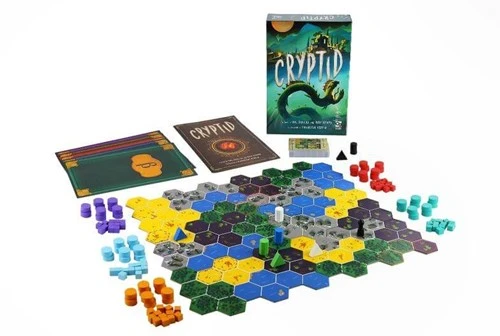
Cryptid is a boardgame in which three to five players try to find "the cryptid". To this end, you first pick a random scenario card. The card specifies how to put down the six parts of the map, and which player receives which "hint". A hint is something like "The cryptid can be found either on water or in a forest". Throughout the game, you are questioning the other players, trying to determine what each of their hints are so that you can be the first to find the cryptid.
There's a few features to the map. Each tile has a terrain type: Forest, Swamp, Desert, Mountain and Water. A tile can contain a structure - either a shack or a standing stone - and that structure has a color (blue, green, white, black). There are also some areas of 2-3 connected tiles that contain an animal territory, indicated by a dashed border. The animals are bears and cougars.
During each of your turns, you either guess at a location - in which case, each player in order will tell whether or not you are correct - or question another player to see if a certain location is allowed by their hint.
Reinforcement learning
Reinforcement learning is a Machine Learning algorithm in which an agent will "Learn" how to properly navigate a problem by exploring and taking that feedback, building "knowledge" about the problem and using that to find an optimal course.
I won't go into too much detail, but we'll be trying to use "Episodal Q-learning". The name of this technique is about the way we acquire knowledge, which is represented by the "Q matrix" and the algorithm is about the rules of putting the knowledge in. In our problem the algorithm is rewarded for winning the game (a game is an episode) and punished for game length and losing the game.
We'll also have a policy, a way of using knowledge to pick our move, that has a random component. In this case, either explore or pick one of the top ten moves. Not picking "the best" move allows tuning our future bots to different levels (easy, hard), if we ever want to use them like that.
Generating basic functionality
The first feature I wanted to look into was Cursor using a library of sorts. I know that I'm going to use logic around a hexagonal grid, so I can generate some basic functions around that. Some of the functions gave me some trouble - it would generate deeply nested loops. I found that very specific instructions were required, like "write a function that does X" and then "write a function that does Y using the previous function for X".
The game wants you to find objects within distance X. So, a useful function would be that when you have an attribute on a node, you can spread "my neighbor has this" to adjacent/connected nodes. In this case, I want to be able to spread the attribute forest=True to each neighbor. The node itself and its neighbors shall have neighbor_forest=True and their neighbors will have neighbor_neighbor_forest=True, etc. But I don't want to nest a bunch of functions, so just first update neighbors and then see what nodes have neighbors with neighbor_forest, right?
It worked out pretty well (graph_utils.py):
def update_neighbors_with_prefix(
    graph: nx.Graph, attr: str, prefix: str, levels: int = 3
) -> None:
    """
    Update nodes with prefixed attributes based on the presence of the attribute in neighboring nodes.

    Parameters:
    - graph: A networkx graph (nx.Graph)
    - attr: The attribute to check for
    - prefix: The prefix for the new attribute
    - levels: The number of levels to check (default is 3)
    """
    for level in range(1, levels + 1):
        current_neighbor = "_".join([prefix] * (level - 1))
        current_attr = f"{current_neighbor}_{attr}" if level > 1 else attr
        new_attr = f"{'_'.join([prefix] * level)}_{attr}"
        updates = {}
        for node in graph.nodes:
            # Check if the current node or any of its neighbors have the attribute set to True
            has_attr = graph.nodes[node].get(current_attr, False) or any(
                graph.nodes[neighbor].get(current_attr, False)
                for neighbor in graph.neighbors(node)
            )
            updates[node] = {new_attr: has_attr}

        nx.set_node_attributes(graph, updates)


def enrich_node_attributes(graph: nx.Graph) -> nx.Graph:
    """
    Enriches the graph by adding attributes to each node indicating whether
    the node or its neighbors (up to 3 levels) have a certain boolean attribute set to True.

    Parameters:
    - graph: A networkx graph (nx.Graph) with boolean attributes on nodes (one-hot encoded).

    Returns:
    - The enriched networkx graph with additional attributes.
    """
    # Identify boolean attributes
    boolean_attributes = set()
    for node, attrs in graph.nodes(data=True):
        boolean_attributes.update(
            attr for attr, value in attrs.items() if isinstance(value, bool)
        )

    # Update attributes for all levels
    for attr in boolean_attributes:
        update_neighbors_with_prefix(graph, attr, "neighbor", levels=3)

    return graph
Basic tests
So now we want to create a test suite for the same functions we generated. I simply created a new file, opened up ctrl+k for inline edits and used the prompt "Use @graph_utils.py and generate unit tests for each function in it", generating the unit tests for me.
For example, we tested the upper function (test_graph_utils.py):
  def test_enrich_node_attributes(self):
        enriched_graph = enrich_node_attributes(self.graph)
        for node in enriched_graph.nodes:
            attrs = enriched_graph.nodes[node]
            self.assertTrue(
                any(
                    attrs[f"neighbor_is_{terrain}"]
                    for terrain in ["swamp", "forest", "water", "mountain", "desert"]
                )
            )
What I found is that the testing isn't exhaustive, and if you want to add more test cases and particularly edge cases you will need to be explicit.
The Game
Generating random terrain types and structures for different nodes was easy enough. The first really interesting function was creating animal territories. These need to be connected territories of 2-3 tiles. Cursor solved it readily (graph_generate_random_area.py):
def add_connected_area_attribute(G: nx.Graph, attribute: str, N: int) -> None:
    """
    Orchestrates the process of adding an attribute to a random hexagon node and generating
    a connected area of N nodes with the given attribute set to True.

    Parameters:
    - G: The networkx graph (nx.Graph) representing the hexagonal grid.
    - attribute: The name of the attribute to be added.
    - N: The size of the connected area to be created.
    """
    if N > len(G.nodes):
        raise ValueError(
            "N cannot be greater than the total number of nodes in the graph."
        )

    initialize_node_attributes(G, attribute)
    start_node = select_random_start_node(G)
    connected_area = expand_connected_area(G, start_node, N)
    assign_attribute_to_nodes(G, connected_area, attribute)
    def select_random_start_node(G: nx.Graph) -> int:
    """
    Select a random starting node from the graph.

    Parameters:
    - G: The networkx graph (nx.Graph).

    Returns:
    - A randomly selected node.
    """
    return random.choice(list(G.nodes))


def expand_connected_area(G: nx.Graph, start_node: int, N: int) -> set:
    """
    Expand from the start node to create a connected area of N nodes.

    Parameters:
    - G: The networkx graph (nx.Graph).
    - start_node: The node from which to start the expansion.
    - N: The desired size of the connected area.

    Returns:
    - A set of nodes that form the connected area.
    """
    visited = set()
    queue = [start_node]

    while queue and len(visited) < N:
        current_node = queue.pop(0)  # BFS: FIFO
        if current_node not in visited:
            visited.add(current_node)
            neighbors = list(G.neighbors(current_node))
            random.shuffle(neighbors)  # Shuffle to ensure randomness
            queue.extend(neighbors)

    return visited
With the map now in place, I figured I was ready to create a "solver" - having perfect knowledge of each player's hint, where is the solution?
The way the hint structure was setup, each player has a tuple with attributes that should be true on the node. It was straightforward to solve (game_rules.py):
def hint_applies(G, node, hint):
    for attribute in hint:
        if G.nodes[node].get(attribute, False):
            return True
    return False


def count_tiles_fitting_hints(G, hints):
    count = 0
    fitting_nodes = []
    for node in G.nodes():
        if all(hint_applies(G, node, hint) for hint in hints):
            count += 1
            fitting_nodes.append(node)
    return count, fitting_nodes
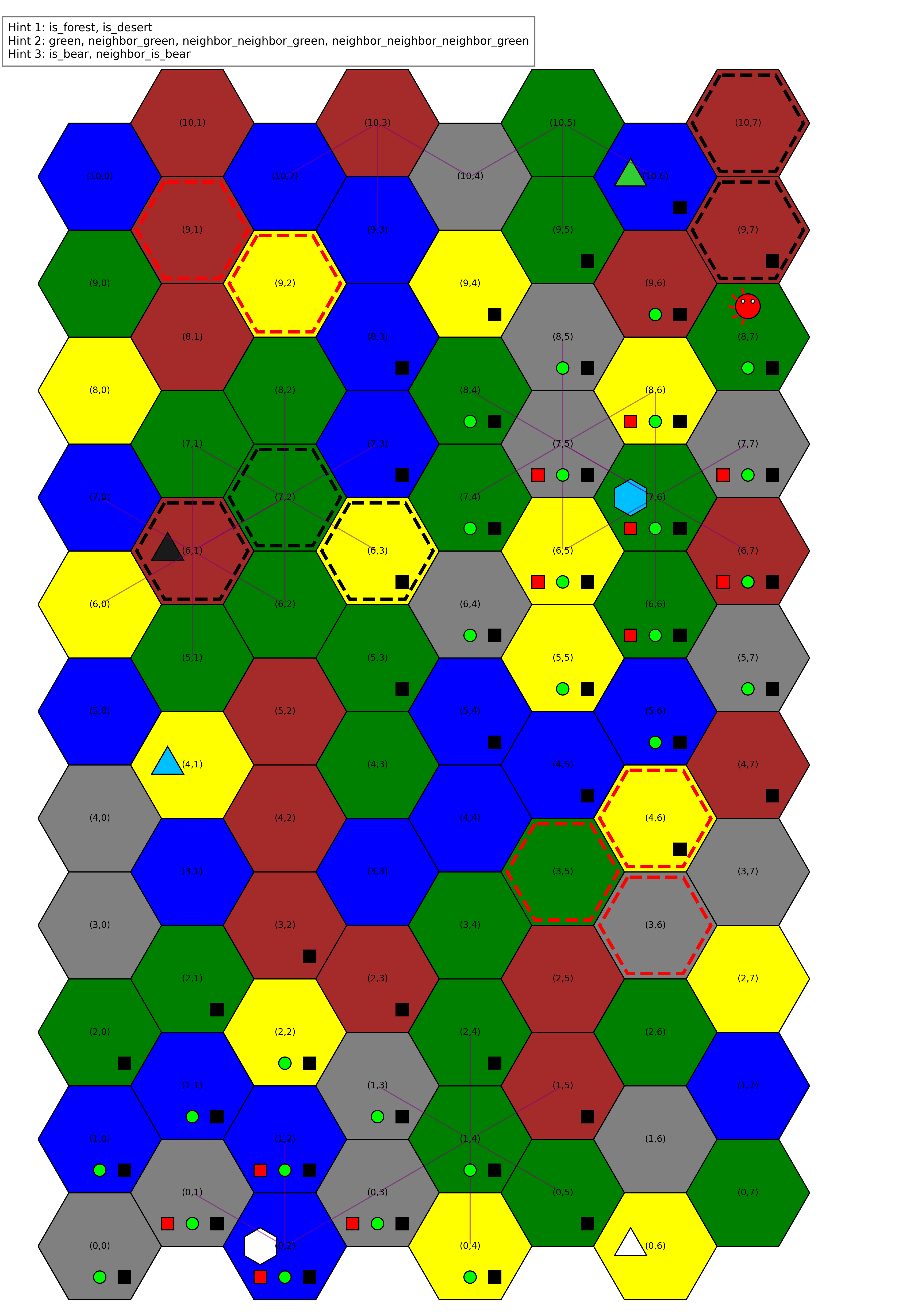
But something didn't quite check out. I started evaluation by hand and quickly found that the proposed solutions were wrong.
I instructed cursor to visualize the map, and add some extra elements. First, I had it place game tiles to visualize the adjacency logic. Around a certain color structure, if neighbor_structure is true, add all game pieces. For neighbor_neighbor_structure, add all but one, etc.
The pattern originally laid out didn't make sense. So I prompted to pick some random nodes and draw a line to their neighbors - aha! One of the basic functions, generate_hexagonal_grid, had the adjacency wrong! It took some specific prompting to get it right. Now, at the start of every episode, I generate the image to the left so that I can sanity check the map.
I'm not going to run you through all the code, but here's a short list of highlights:
- plotting with patches: Cursor quickly learned to generate functions that created different patches for the visualization part.
- board.py: The generate game map function looks nice and clean.
- game_rules.py: Implementing episodal Q learning was a breeze
- graph_utils.py: Initially I thought to create unique codes for each map state, but this wouldn't work for a game like this. Regardless, it was a problem solved readily.
- game_rules.py: The running code was quite slow, but didn't ask a lot of my CPU. I instructed Cursor to refactor some things into being parallel, and it readily did so.
It wasn't all easy, though. I ran into several problems, some more specific to Cursor and some more to using LLMs.
One that I think is specific to Cursor: I kept having random duplicate functions in my code. I didn't really figure out what caused it, but my surmise is that when I closed Cursor without accepting changes, it would keep the old and the new but lost the context. After I rigorously started accepting changes before closing, I did not notice the problem again. I also started regularly using the LLM chat (CTRL+L) to tell me whether there were duplicate functions in the code.
The more general one is hallucinations. Even with my code base indexed and sometimes provided specific instructions to use a certain file, the LLM would regularly start imagining things. For example, at several times it imagined is_legal_move being a function in game_rules but it just wasn't there. Usually, resetting the LLM context by restarting Cursor did wonders for its hallucinations. But keep in mind they do happen, and that sometimes it will also just create code that can't fail but is completely useless. Evaluate what it did rigorously before you accept the change. Zero hallucinations is possible (a fun story around this).

Coding style comment
It's very helpful to separate code into orchestrators and execution functions. An orchestrator is a recipe; it calls several execution functions, it might loop over a variable and call the execution function, but it doesn't contain any true logic itself.
This makes it fairly straightforward to unit test and keeps the code looking clean.
Takeaways
Using an LLM code editor was fun. The requirement that I was only allowed to prompt sometimes frustrated me, especially when I saw exactly what needed to happen but had to engineer a specific prompt to get it to happen.
Another point is that I often had to prompt Cursor to refactor the code it generated. It might be because it trained on StackOverflow, but a lot of the code it wrote wasn't tidy, was large blocks of spaghetti, or wasn't DRY. A common prompt would be "Write a function do_something(x) that does something, then write a function orchestrate(y) that calls do_something(x) for each x in y". It works, and over time I usually included this kind of instruction to ensure I got cleaner code. (We don't talk about reinforcement_learning.py).
Some things are straightforward problems for Cursor to tackle. "For this list of tables, create an API to read data". That is one of the larger categories of code problems to solve and Cursor excels at it. By working on a specific boardgame with specific rules, I was able to put Cursor to the test a bit more. It worked out, but only with prompt engineering and practise.
Conclusions
Interacting with this LLM makes me think of training a new person. I'm giving specific instructions, because they don't know what's expected. I'm carefully evaluating the results for the same reason, often double checking the logic and making sure there are no weird additions.
When you train a new person, you don't expect 200% productivity immediately. Rather, you expect the senior to have less productivity and the result to be 100-150% productivity for both of them together, but with (eventual) results around 200% or more.
LLM-enhanced coding feels like that. I'm more efficient, but I am differently engaged. Slowly, the LLM and I get used to each other and we're working together better. My productivity is enhanced.
It only works because I'm a more senior developer who can write these specific prompts. LLMs replace juniors because they're more productive. How would we get new seniors in that world? What does the new growth path from a self-taught kid on the internet or new graduate to the senior developer look like? We need to consider questions like that, or we will eventually find ourself without new developers.